Posts

Showing posts with the label windows

Microsoft Windows and SQL Server Versions

Image
Unless you are good with remembering numbers, you can't just look at the version number information of MS Windows or MS SQL Server and tell what the release, SP levels etc are. To quickly establish a correlation, you can use these two resources: Operating System Version (Windows) Microsoft SQL Server Version List For a quick reference, I have copied the latest information here: Operating system Version number Windows 10 10.0* Windows Server 2016 Technical Preview 10.0* Windows 8.1 6.3* Windows Server 2012 R2 6.3* Windows 8 6.2 Windows Server 2012 6.2 Windows 7 6.1 Windows Server 2008 R2 6.1 Windows Server 2008 6 Windows Vista 6 Windows Server 2003 R2 5.2 Windows Server 2003 5.2 Windows XP 64-Bit Edition 5.2 Windows XP 5.1 Windows 2000 5 * For applications that have been manifested for Windows 8.1 or Windows 10. Applications not manifested for Windows 8.1 or Windows 10 will return the Windows 8 OS version value (6.2). RTM  (no  SP ) SP1 SP2 SP...
Prevent Java installer and updater from offering bonus products

Image
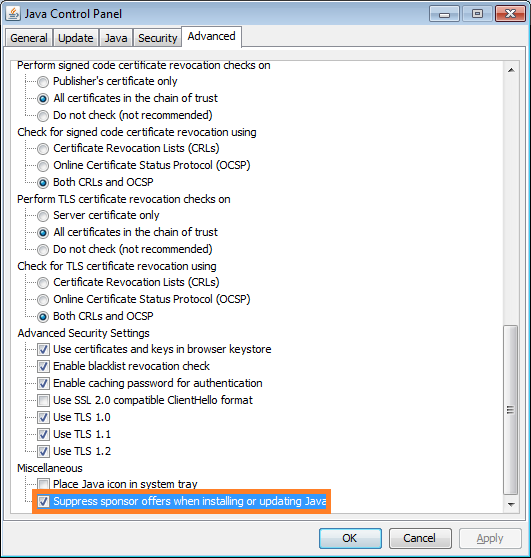
Java installer and updater offers bonus products like browser toolbars, that are mostly useless and annoying (unless you love those toolbars adorning half of your browser real estate). Not only does it offer you those products, but marks them for installation by default. These guys know you don't want it, and make it slightly tricky to uncheck them. You have to click exactly on the check box; usual UI should allow it even when you click on the adjacent text. But no, you have to click on the checkbox. You have to remember to uncheck it during installation or every time you update to prevent those toolbars from being installed. You can stop the installer or updater program from offering such products by selecting "Suppress sponsor offers..." option in their advanced setting. Go to Control Panel Go to Java (xx-bit) Go to the Advanced tab Scroll to the bottom of the list Add a checkmark to Suppress sponsor offers when installing or updating Java Alternatively...

Downloads folder in Windows loads slowly

Image
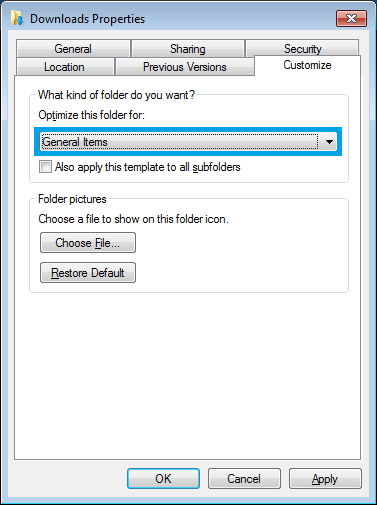
The downloads folder is the default location for files downloaded from various folders (some browser let you choose one during download and allow them to use a separate folder). The downloads folder usually ends up being optimized for images and when you have other files, it tends to slow down the file listing as you open it. One of the tricks is to change the settings of this folder to optimize it for a variety files and not just for pictures. Right click on the Downloads folder, select Properties and go to Customize tab. Select General Items from the drop down for Optimize the folder for . Click on Apply and OK to save the changes. More posts on proper usage of Windows OS: I changed Open with option of all the exe files. How to fix it? Prevent DDoS attacks on Skype. Get rid of animations and focus on task at hand. Attaching a file to a jpg.

Block ads and malware sites by using hosts file on router

Image
I browse the web using multiple devices and adding ad-blocker or ad blocking host files to all the devices is a boring thing to do and sometimes it is not possible without jail breaking the device. I have an old wireless router ( TP-Link TL-WR740N v4 ) and I am using it to test out DD-WRT's ability to use a custom host file on it. What is DD-WRT? DD-WRT is a third-party firmware that works for a huge number of wireless routers from a variety of manufacturers. The community of DD-WRT users have created a great list of resources, which makes it easy to understand and use. You can check this database to find out if your router is supported. My router is supported! Download and Install the Firmware The next step would be to download the firmware suitable to your router. The downloads can be made from ftp.dd-wrt.com Stable releases were last updated in 2008. I will be using beta firmware. I have selected a firmware version which is known to work without issues on m...

Change your Skype settings and avoid DDoS attacks

Image
If you know someone's Skype username, you can get their IP address. The person can enable some options that stop non-contacts from getting their IP address with just their Skype username, but most people don't know how to do that. It also isn't foolproof. You can be invited to a conversation by someone else, then everyone in there can get your IP address. Your IP address is then used to DDOS you. DDOS stands for Distributed Denial of Service. You get so much data sent to your IP that it makes your internet connection largely unusable. Thus you lag a lot or disconnect from the game you're playing, which sucks if you're in the middle of a competitive match. You can protect yourself better by using something other than Skype, or by buying a proxy and setting up Skype to use said proxy. Proxy aside, here are some some Skype settings you can set to better protect yourself: Options -> Advanced -> Connection -> Uncheck "Use port 80 and 443...

How to check the processes and services run by svchost.exe

Image
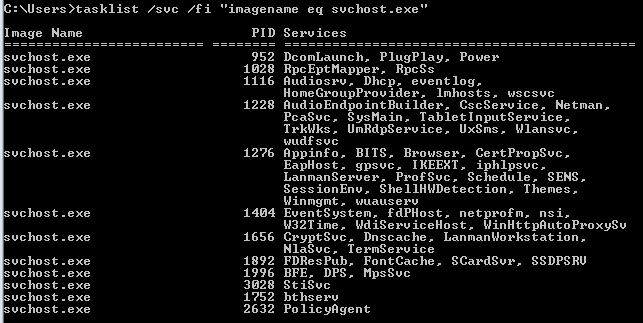
On Windows, applications are built as exe files and code libraries are built as dll (dynamic-link library) files. The dll files contain reusable programs such as database engines, 3D renders, graphing capabilities etc. The application developers need not bother about writing these libraries all over again and can use these libraries by referencing the dll files in the application program. Exe files can run as a process, but that is not possible for dll files. Windows needs an exe process to load the dll file(s) and then let other processes call a function in the dll code. One more reason for hosting dlls separately is that some of the code has to run as a super user and running that code from the application as a constrained user is not possible. svchost.exe does the job of loading the dll files in a process with SYSTEM user. One or more dll files are grouped by their functions and are loaded into the svchost.exe process. So based on the number of groups these dll files can fo...

Get rid of animations and focus on task at hand

Image
When you are closing, opening or minimizing windows, animation effects are rendered (I guess to make it look more dramatic). I can live without those animation effects, and if you are like me, you can turn off unnecessary animations by following these steps: Open the Control Panel and click on  Ease of Access Center . Scroll down and click on  Make it easier to focus on tasks. Scroll down again and check the option Turn off all unnecessary animations Apply the changes

Microsoft to Support Secure Shell (SSH)

Image
Good news from Microsoft PowerShell Team! Microsoft will be supporting SSH on Windows. The solution is in the planning stages and the date of availability is not known yet. If I am reading the announcement from the PowerShell team right,  you can SSH into a Windows box from *nix and vice-versa. Hopefully key based authentication using PuTTY will be possible as well. In case you can't wait, there are third party solutions available right now, such as  PowerShell Server , that support SSH and SFTP in to Windows. Windows 10  has already brought in "drag to select text", ctrl-c and ctrl-v to the command prompt; and now this announcement! I hope this also means SFTP and SSHFS support. Then we could finally say goodbye to SMB! This is a really helpful support to system admins from Microsoft! Share it on Facebook Twitter Google+ LinkedIn

Taking a Full Webpage Screenshot using Firefox

Image
If you need to take a screenshot of the entire webpage, you can use Firefox's built in command line feature to achieve it. Press Shift + F2, a command line prompt will appear at the bottom-left part of the browser window. Type screenshot --fullpage and press enter. The page will be saved in your default download location. There are other options available on the command line which can be looked up using the command help

Icon appearing on the Taskbar for a second

Image
After a recent patch, I started seeing an icon appear every minute or so on the taskbar and vanishing within a second. This was quite annoying while typing or watching full screen videos as it removed focus from my active window. To check what is causing the problem, I opened Task Manager (Ctrl+Shift+Esc) and sorted the processes by CPU. As soon as the icon reappeared, I notice  UI0Detect.exe showing on the top. UI0Detect.exe is an "Interactive Services Detection" that helps with user interaction if required by Windows services. Whatever UI this service was trying to present was not helping me as it popped up only for a fraction of a second, so I decided to disable it. The following steps helped me: Right-click on "Computer" icon on desktop and select "Manage" Expand "Services and Applications" Click on "Services" Right-click on "Interactive Services Detection" from the list Select "Stop" Right-click...

SAP Note Shortcut on Chrome

Image
We have seen how one can define a search engine for searching SAP notes from Firefox . It can be done on Chrome also. Right click on the address bar and choose Edit search engines... Fill out the fields as follows Name: sapnote Keyword: s URL: https://service.sap.com/sap/support/notes/%s When trying to open a note type s followed by the note number

Fixing Slow YouTube on Chrome

Image
YouTube and many other online video hosts have been slow or under-performing while using Chrome. Chrome has its own built in flash player which YouTube uses to play videos. The performance of this player has been down lately. Until that gets fixed you can switch to using the official Adobe flash player installed on your computer by following these steps: Type about:plugins in the address space Search for "adobe flash player" plugin (usually the first entry) Expand the details by clicking on Details on top-right hand side of the page Find the plugin pepflashplayer.dll Disable the plug-in by hitting "disable" immediately below Restart Chrome to activate the change

Short Boot Times on Windows 8 - Shutdown hibernates the kernel

When you shut down Windows 8, it hibernates the kernel, so when start it up again, it comes back up fast. This is a big problem when you make hardware changes and can result in data corruption and stability issues. Whenever you make hardware changes on Windows 8 system, do a (cold) shutdown or restart.

Wifi not working after installing Windows 8

After upgrading to Windows 8, I got the following error: wifi doesn't have a valid IP configuration I switched the Wifi settings from AES to TKIP and it started to work! If you can't get the wifi working on Windows 8,  go to Start > control Panel (show small icons) > network and sharing center > click (on left) wireless networks > right click your network > properties. Select Security Tab, and change the type to AES from TKIP, and click okay. If you don't use AES settings, you may still want to change it to any other setting and see if it works.

How to monitor file transfer progress in FTP

When you are transferring a large file using the ftp command line tool, you are not really sure if the transfer is going on or not. The prompt take hours to return with success or failure message. A very simple way to monitor the transfer is to use hash command in the FTP prompt. Example: $ ftp <host> user: <user name> password: <pass> ftp> hash Hash mark printing on (1024 bytes/hash mark). ftp> get a_very_large_file 200 PORT command okay. 150 Opening data connection for a_very_large_file ######################################## 226 Transfer complete.

Use of SIGUSR1 and SIGUSR2 on SAP Kernel

SIGUSR1 and SIGUSR2 are user-defined signals that can be sent to a process to perform the pre-defined actions. SAP has implemented these signals to help increase/decrease trace on the kernel program. The following actions are defined for the SIGUSR1 and SIGUSR2 signals on SAP programs like disp+work, gwrd, msg_server, icman, saprouter etc. 1. SIGUSR1 reduces the trace level by one 2. SIGUSR2 increases the trace level by one and writes the current call stack of the program to the trace file. The stack can then be used to determine which operating system routine the process is currently in. Then switch the trace level downwards with SIGUSR1 as, otherwise, the entire program flow is logged in the trace file and the size of the file increases very quickly . If you send the SIGUSR2 signal to an SAP work process (kill -USR2 <PID of work process>), the signal handler executes the pre-defined funtion for SIGUSR2 and the trace is written to dev_w<N> trace file. The trace is ...

Disaster Recovery Plan

Disaster Recovery is the process, policies and procedures of restoring operations critical to the resumption of business, including regaining access to data (records, hardware, software, etc.), communications (incoming, outgoing) workspace, and other business processes after a natural or human-induced disaster. Here are some common aspects of designing a Disaster Recovery environment for a business application: 1. DR Server The server-that you intend to use in case of disaster-should contain the same version/patch of the Operating System as the primary server. You have to ensure that the disk allocation is similar to that of primary. You need not allocate identical server resources on the DR site, but you may need them when you intend to run the DR site as primary in the event of a disaster. 2. Standby Database Most of the database vendors provide you with an option to install and maintain a standby database, which keeps itself cloned with the primary database. Ex: ...

How to Improve Firefox Performance

Image
The performance of Firefox can be improved by simply defragmenting its data files. By adding a script to run every time you start your computer, you can keep the files defragmented. Download sqlite from http://www.sqlite.org/download.html and place it in C:\Windows folder. Open notepad and copy these lines into it. Replace <YOUR_USER_ID> and <YOUR_PROFILE_FOLDER> with the actual values relevant to your system: cd C:\Documents and Settings\ <YOUR_USER_ID> \Application Data\Mozilla\Firefox\Profiles\ <YOUR_PROFILE_FOLDER> for %%i in (*.sqlite) do @echo VACUUM; | sqlite3 %%i exit Save the file with .bat extension. Create a shortcut to the batch file and place it in startup folder C:\Documents and Settings\ <YOUR_USER_ID> \Start Menu\Programs\Startup Now every time you start your computer this batch script will run and defragment the Firefox data files.

FTP Scripts for UNIX and Windows

Here are example FTP scripts to get a file from an FTP server. UNIX: With this script, pass the ftp server hostname, user ID, password and file name with the command. If the script's name is myftpscript.ksh here is how you should use this script: myftpscript.ksh ftp_server user pass file_name #!/bin/ksh HOST=$1 USER=$2 PASSWD=$3 FILE=$4 # Change to working directory cd /ftp_working_directory #Delete existing file if [ -f ${FILE} ]; then rm ${FILE} fi #Download file from ftp server ftp -vn $HOST <<END_FTP > /ftp_working_directory/ftplog 2>&1 quote USER $USER quote PASS $PASSWD ascii get $FILE bye END_FTP exit 0 Windows: Again, pass the ftp server hostname, user ID, password and file name with the command. If the script's name is myftpscript.cmd here is how you should use this script: myftpscript.cmd ftp_server user pass file_name @ECHO OFF set PATH=C:\ftp_working_directory;%PATH% pushd "C:\ftp_working_directory...

Why is Flash Player Slow while Playing Video

The flash elements like buttons, sliders and controls are designed in RGB color space, whereas the video is streamed in YUV. While presenting, the YUV video stream is converted to RGB and then combined with the RGB flash elements. This conversion is CPU intensive. The problem is magnified when you see the video in full screen mode. You can avoid this problem by installing  FlashVideoReplacer add-on on Firefox. This add-on will open the video with a standard multimedia player of your choice.